Guide

Tracking Claude Code and Codex limits across several accounts

If you run more than one Claude Code or Codex account, you need to know which one still has room, and to notice when the agent stops. This is how Nightdesk keeps track of that for you.

By Sheroze, who built Nightdesk · All guides

01The problem

Why several accounts get confusing

Claude Code and Codex both limit how much you can use before a reset: on most plans a 5-hour window and a weekly one. If one account doesn’t last your week, you end up with two or three, and then you’re keeping track of which one has room, when the blocked one comes back, and whether the agent stopped while you were out.

Otherwise you sign in to each account or run /usage in each folder. AI limits in Nightdesk puts all of it on your phone.

02What you get

Every account in one list, and a buzz when one runs out.

  • Every account, by email. Each Claude Code and Codex account on each of your computers, with its plan, the computer and folder it’s on, and how much of each limit it has used.
  • Next free. A blocked account counts down to the minute it resets, and the one that’s free first sits at the top.
  • Alerts. When one hits a limit your phone says so, even when it isn’t linked: “Claude Code · you@example.com. Hit its weekly limit. Resets Thu 9:00 AM.” If you want, it also warns you at 80% and 95%, and tells you when an account is free again.
  • Fresh numbers. Your computer asks Claude Code and Codex for their current usage, the same as running /usage yourself, when you open the screen and every few minutes while you watch. You can switch that off.
  • Cleaning up. Mark an account you stopped paying for and it leaves the list and stops alerting. Remove one and it’s gone on every device. 90 days of history show which account runs out first.

On Android now, coming to iPhone and iPad.

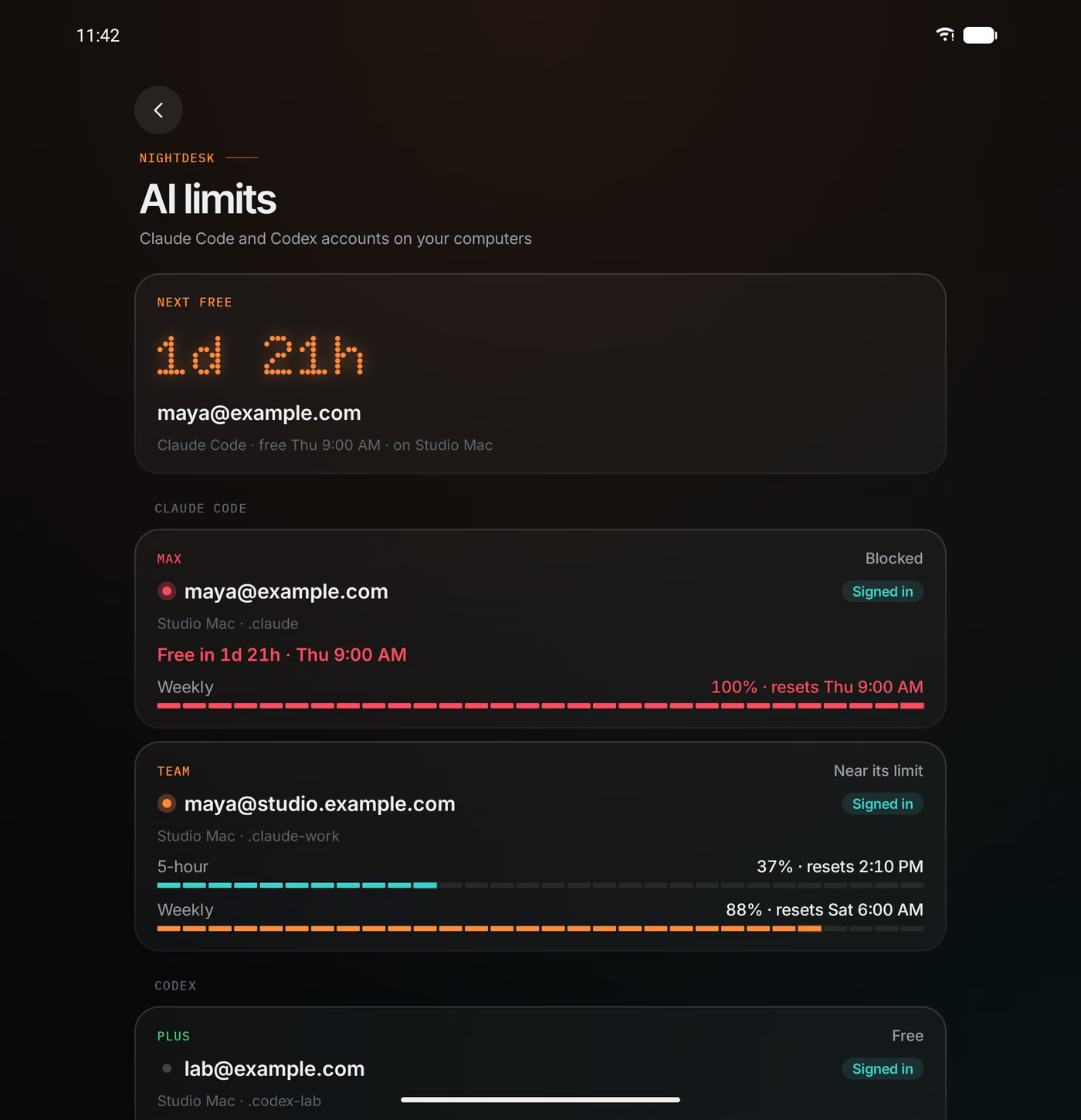
Nightdesk’s AI limits on an open foldable. Next free: maya@example.com, Claude Code, in 1 day 21 hours. Claude Code: maya@example.com, Max, blocked at 100% of its weekly limit until Thursday 9:00 AM; maya@studio.example.com, Team, near its limit with 37% of its 5-hour and 88% of its weekly limit used. Below, the Codex accounts.
A notification from Nightdesk, from Studio Mac: Claude Code · maya@example.com. Hit its weekly limit. Resets Thu 9:00 AM.
AI limits on an open foldable, with the alert that came in. The accounts are made up for the picture.

03How it knows

It reads files on your computer

Nightdesk for Mac and Linux read what Claude Code and Codex already write on your computer: the signed-in account, its usage and its limit messages. They look in ~/.claude, any ~/.claude-* folder and CLAUDE_CONFIG_DIR, and in ~/.codex, any ~/.codex-* folder and CODEX_HOME, so however you keep your accounts apart, each one shows up.

Nightdesk doesn’t sign in to any account or read its keys, and it doesn’t contact Anthropic or OpenAI itself. The emails and numbers stay between your computers and your phone, end-to-end encrypted.

When your phone isn’t linked, the computer leaves the alert at Nightdesk’s relay in an encrypted note only your phone can read. The Google Play app picks it up within about 15 minutes, and the relay deletes the note once it’s picked up, or after 7 days.

04Set it up

Three steps

  1. Install Nightdesk on each computer you run agents on

    Mac or Linux, free on both. AI limits came in version 1.44, and the fresh numbers in 1.66; the downloads are newer than both.

  2. Pair your Android phone with each one

    Install Nightdesk from Google Play and scan the code each computer shows.

  3. Open AI limits

    It’s in Settings › AI limits, and every alert opens it. The alerts are on from the start; the 80% and 95% warnings and “Tell me when an account is free again” are switches there.

05Other ways

Other ways to keep an eye on your limits.

There are good menu bar apps that show Claude and Codex usage on a Mac, and command-line tools that add up what your local logs say. If you’re sitting at the Mac, they work well.

I put this on the phone because the moment an agent runs out is often a moment you’re away from the desk, and because it puts every account from every computer, Mac and Linux, in one list. When one is blocked, you can link from the same app and tell the agent to carry on with an account that has room.

What it looks like on an ordinary day

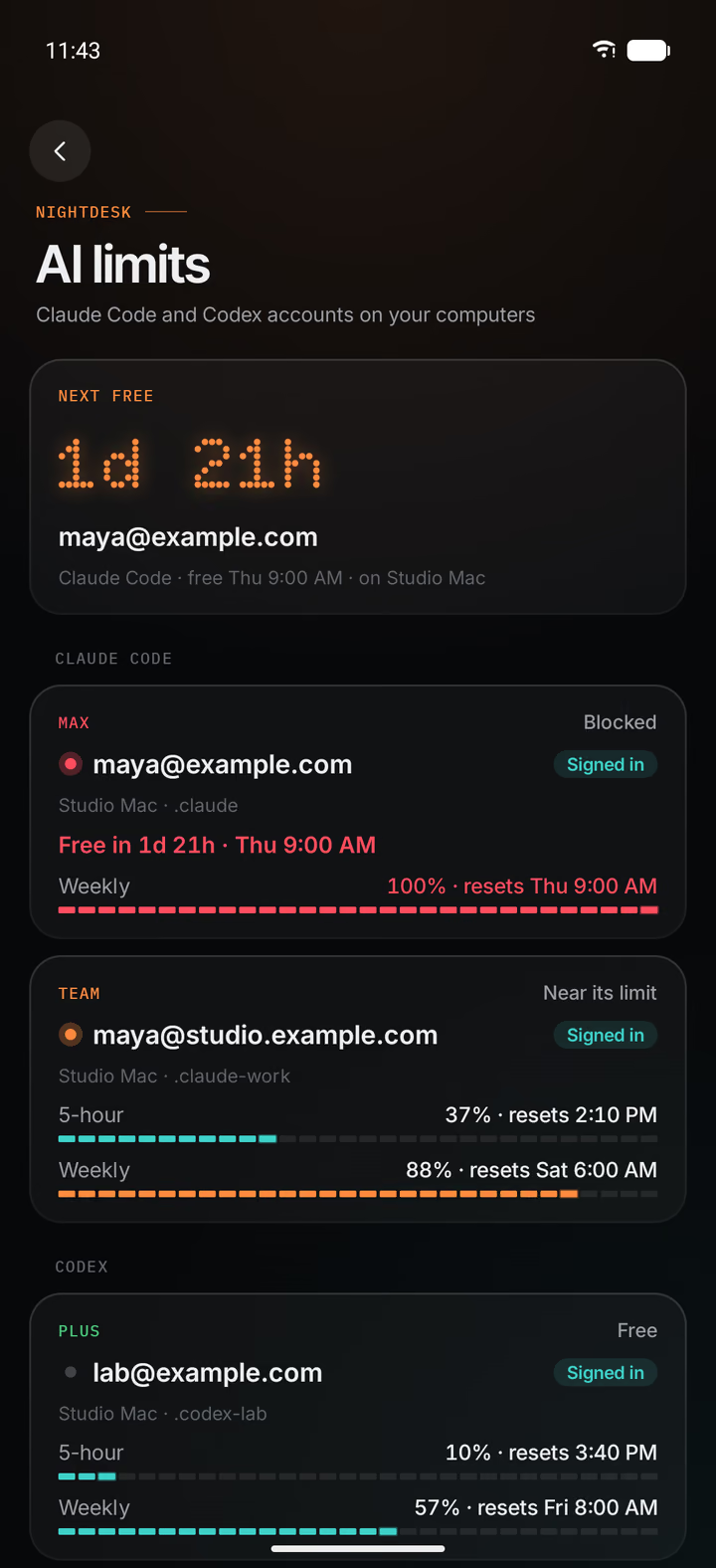
Nightdesk’s AI limits screen on a phone. Next free: maya@example.com, Claude Code, in 1 day 21 hours, Thursday 9:00 AM. Below, maya@example.com is blocked at 100% of its weekly limit, maya@studio.example.com is near its limit at 88%, and the Codex account lab@example.com is free.

Switch to the account that’s free next

Tuesday, 10:12 a.m.Maya, indie developer

Maya pays for two Claude Max plans and a Codex one, because one account never lasts her week. She left Claude Code on a big refactor and went to a client meeting.

When an account runs out, her agent stops. Finding one that still had room meant signing in to each and checking its usage page.

How

  1. Her phone buzzes: “Claude Code · maya@example.com. Hit its weekly limit. Resets Thu 9:00 AM.”
  2. She taps it. AI limits counts down to that reset and shows the rest: her studio account at 88% of its week, Codex at 34%.
  3. From the corridor she links, asks Codex to pick the refactor up in Write, and turns on “Tell me when an account is free again.”

Her agent waited minutes, not the rest of the morning.

Nightdesk 1.44 or later on your Mac or Linux computer, and on your Android phone or tablet.

Find out your agent hit its limit while you’re out

6:40 p.m.Kwame, ML engineer

Kwame started Codex on a long change to the data pipeline on the Linux workstation at home, then went to the gym. His phone stayed in the locker, linked to nothing.

When Codex hits its 5-hour limit it simply stops, and he wouldn’t have known until he got home.

How

  1. Nightdesk on the workstation sees it and leaves an alert at the relay, encrypted for his phone alone. The phone picks it up: “Codex · kwame@example.com. Hit its 5-hour limit. Resets 9:40 PM.”
  2. He turns on “Tell me when an account is free again.” At 9:40 his phone says kwame@example.com is free again.
  3. He links from the couch and tells Codex to carry on, in Write.

Not a minute of the new window wasted, and he never had to check.

Nightdesk 1.44 or later on your Mac or Linux computer, and on your Android phone or tablet.

Every use case

More guides

Try it on your own computer.

The Mac and Linux apps are free. On Android, everything is on for 3 days from your first link, with no card and no account, and after that it’s $4.99 a month or $57 once (US prices; Google Play shows yours). Nightdesk for iPhone and iPad is coming to the App Store.